

Go back to the index page.
Connecting the Motenc Output Boards
Be extremely carefull!
The connection cable from the 7525 DAC-Encoder Output Board can be connected reversed.
The right connection to the 7541 or 7545 PCI Board lets the led turn green on the 7525 Board.
No additional supply voltage is needed for the DAC's or Encoders (as long your encoder is 05VDC).
In our setup we managed to kill an encoder.
A few words about PYVCP
PYVCP stands for Python Virtual Control Panel.
PYVCP uses a scripting language which is called XML.
XML is straightforward and family of the oll HTML, but a lot more sensitive and less forgivingly.
Pyvcp gives a virtual impression on the state of the IO's , DAC's and Encoders.
DAC= Digital to analog converter= an IC.
PYVCP is a one way street; cannot give commands to the machine.
A variant of PYVCP that CAN command the machine is Glade PYVCP.
Test Panel Commands in Terminal
We lodged the "testpanel.hal" and the "testpanel.xml" on the Desktop (in Dutch the Bureaublad)
go in Terminal to Bureaublad (met B niet b)(this is for the Dutch Version; Ubuntu is case sensitive in Terminal)
going to the desktop (Bureaublad) shortens the commands.
halrun -I loadusr pyvcp -c testpanel testpanel.xml
halcmd: loadusr halmeter (extremely helpful to determine pins & signals)
NEVER FORGET TO GIVE HAL A 'start'....
Connect the hal-file to the Python Virtual Control Panel with:
halcmd: source testpanel.hal
HAL stands for HARDWARE ABSTRACTION LAYER and is comparable with the programming language of SPS S7 of Siemens.
HAL contains functions, connections and parameters for all hardware.
More about HAL can be found in the HAL User Manual on http://linuxcnc.org.
Combining the start of the pyvcp and hal results in the following command:
$ halrun -I -f testpanel.hal
It is possible to give HAL induvidual commands via terminal for testing.
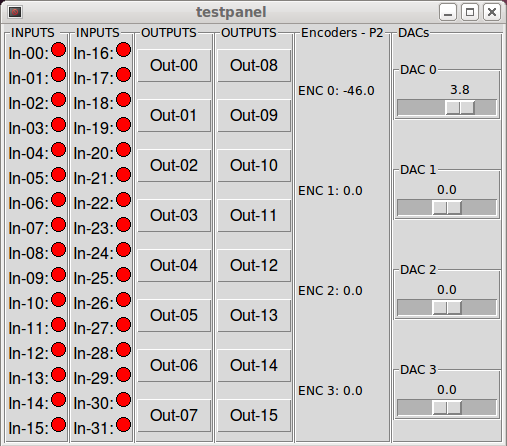
View of the Motenc Test Panel
The Files of the Motenc Test Panel
#1.testpanel.xml
#2.testpanel.hal